


Horizon Blue
4.71.13K Reviews
App Specs
- Version
- 2.11.1
- Updated On
- License
- Free
- Downloads
- 100,000+
- Developer
- Horizon Blue Cross Blue Shield
- Categories
- Medical
- Platform
- Android
Screenshots
 Analysis by AppCompare
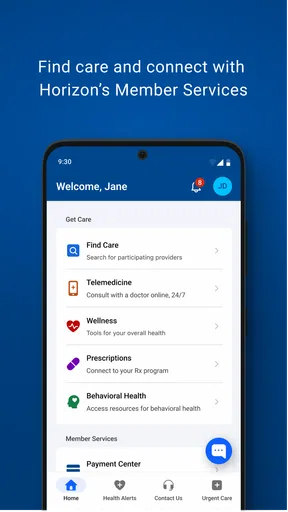
Managing health insurance is rarely difficult because of one complicated task. The friction usually comes from having to find several small pieces of information at the right moment: plan details, member information, coverage-related documents, or a way to reach the right support channel. Horizon Blue is designed around that everyday problem. Developed by Horizon Blue Cross Blue Shield, this free medical app puts health plan information in one place instead of making you depend entirely on paper cards, desktop browsing, or a phone call.
I found its central value less exciting than a fitness tracker or symptom checker, but more practical for people who already use this insurer. It is not trying to replace a doctor, diagnose an illness, or become a complete personal health journal. Its job is narrower: make your relationship with your Horizon plan easier to manage when you are away from a computer. That focus is also the key to deciding whether it deserves space on your phone.
Keeping health plan information within reach
The most important capability here is quick access to insurance information. That sounds simple, yet it can make a noticeable difference when you are checking in for an appointment, speaking with a pharmacy, reviewing your coverage, or trying to understand which part of your plan applies to a particular situation. Instead of treating your insurance account as something you only visit when a problem appears, the app makes it more available during ordinary errands.
In my experience, this is where Horizon Blue feels most useful. Health plan information is easy to ignore until a receptionist asks for it, a bill raises a question, or a family member needs details while you are away from home. Having a dedicated mobile place to start is less stressful than searching through old emails or remembering which website page contains the relevant information.
The app belongs firmly in the medical category, but it should not be confused with a clinical tool. It is an account and plan-access companion rather than a source of medical advice. That distinction matters. If you want medication reminders, exercise tracking, symptom analysis, or a way to record blood pressure, this is not the right type of app. If your main concern is staying connected to your Horizon Blue Cross Blue Shield health plan, its narrower purpose becomes a strength.
The store rating is a 4.7 average from around ten thousand ratings, with roughly a thousand reviews, and the app has passed the one-hundred-thousand-install mark. Those figures suggest that many people find this kind of mobile access worthwhile, although popularity alone does not guarantee that it will fit every plan member’s routine. The experience depends heavily on whether you already receive coverage through the developer and how often you need to consult plan information.
What the focused design changes for everyday use
A focused insurance app can reduce the number of steps between a question and the place where you can begin answering it. That is especially helpful for people who do not want to navigate a full insurer website on a small screen. A website may contain more material, but a mobile app can feel more natural when you are standing at a reception desk or handling a health-related task between other errands.
Worth Reading Before You Choose

EA SPORTS FC Mobile 26 Is a Bigger Football Game, but It Takes Time

Flipboard Shows What News Apps Must Do Beyond the Feed

Switching to Android Auto Means Rethinking Your Driving Routine

Google Calendar Makes a Crowded Week Easier to Manage

Ludo King Makes the Most of the Minutes Between Plans

Baby Panda World Brings Quick Play to Modern Phones, but Its Game Library Feels Busy
One useful habit is to open the app before an appointment rather than waiting until you are being checked in. That gives you time to look through the available plan information calmly, make sure you can sign in, and avoid turning the front desk into a troubleshooting session. I also see value in checking it before calling customer support, because knowing what information is already visible can help you ask a more precise question.
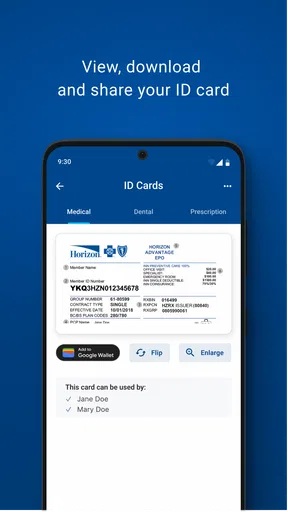
Another practical benefit is reducing dependence on a physical insurance card or a remembered account number. I would still keep important health documents available in another safe place, but the app can serve as a convenient first stop when the paper version is not in your wallet. This is a small change, yet small changes matter when you are already dealing with an appointment, a prescription question, or an unexpected administrative task.
How I would use it before and after an appointment
Imagine leaving work for a medical appointment and realizing that you have not looked at your plan information in months. Rather than returning home for paperwork or opening a browser and searching through bookmarks, you can use Horizon Blue as the starting point for checking the information associated with your plan. If the appointment leads to a billing or coverage question later, the same app gives you a familiar place to revisit the account instead of beginning from scratch.
The best workflow is deliberately simple. Before leaving, open the app and confirm that you can access your account. During the appointment process, use it when you need plan-related information. Afterward, return to it when an administrative question comes up. This is not a dramatic productivity trick, but it creates a repeatable routine that can prevent last-minute searching.
For families, the value can be slightly different. One person may handle most insurance paperwork while another person attends the appointment. Mobile access makes it easier for the person carrying out the errand to consult the plan without waiting for the household organizer to find a document. I would not assume that every family-management need is covered, but the app is well suited to that basic handoff: the person at the appointment has a direct way to begin checking the relevant information.
There is also a useful distinction between information access and information interpretation. The app can make plan details easier to reach, but it cannot remove the need to read carefully or ask questions when a benefit is unclear. Insurance language often depends on the service, provider, and circumstances. I would use the app to prepare for a conversation with Horizon support or a healthcare office, not as a substitute for confirmation when the financial consequences matter.
Where it compares well with the usual alternatives
The usual alternative is a mobile browser pointed at the insurer’s website. A browser can be more flexible and may expose a broader range of pages, but it also introduces distractions: saved tabs, account searches, small menus, and the possibility of landing on a general public page instead of the member area. A dedicated app feels more direct when your only goal is to reach your health plan information.
Paper documents still have one advantage: they work without a login, a phone battery, or an internet connection. I would not discard them simply because the app is convenient. Instead, I see Horizon Blue as the faster option for routine access and paper as a sensible backup for situations where your phone is unavailable. That combination is more reliable than treating either method as perfect.
A phone call has a different advantage. A representative can explain a confusing situation and may be better suited to questions involving exceptions or disputed charges. The app is preferable when you want to look at information independently and avoid waiting. The call is preferable when the information needs interpretation or when the issue cannot be resolved by simply viewing your plan account.
That trade-off explains why I would not call the app a complete replacement for the insurer’s other channels. It is a convenient front door, not the whole building. If your goal is to browse health education, compare clinical services, track personal wellness data, or receive medical guidance, a different kind of app will serve you better. Horizon Blue makes more sense when the administrative side of healthcare is the problem you want to solve.
Small habits that make the app more useful
My first tip is to test access before you need it. Installing an insurance app during check-in is a poor time to discover that you cannot remember your sign-in details or that your account needs attention. A quiet moment at home is better. Once access works, the app becomes a practical tool rather than an emergency project.
My second tip is to treat it as a preparation tool, not just a reference shelf. Before an appointment, think about what you may need to ask and use the available plan information to organize those questions. This can help separate a coverage question from a medical question. The former may belong with the insurer, while the latter belongs with a qualified healthcare professional.
My third tip is to use the app alongside, rather than instead of, your personal records. Keep your own notes about appointments, bills, and questions in whatever system you trust. The Horizon app is valuable for connecting you to plan information, but a personal timeline can make it easier to understand how separate administrative events relate to one another.
A fourth useful habit is to check the app when a healthcare task changes, not only when something goes wrong. A new appointment, a different pharmacy, or a question about a bill can be a reason to review what you already have access to. This prevents the common situation where people only look for insurance information after a confusing charge has already appeared.
Limitations I would consider before installing
The biggest limitation is its audience. If you are not covered through Horizon Blue Cross Blue Shield, the app is unlikely to offer meaningful value. Even if you are comparing insurers or looking for a general healthcare organizer, this is not a neutral tool for managing every part of your health. Its usefulness is tied to the developer’s health plan relationship.
The second limitation is scope. The app’s purpose is access to health plan information, so I would not install it expecting a broad collection of wellness features. That focused approach keeps the experience relevant for members, but it also means people wanting one app for exercise, nutrition, medication schedules, medical records, and insurance administration will probably need additional tools.
There is also the normal friction of digital account access. A mobile app can be quicker than a website once everything is working, but it still depends on your ability to sign in and use your phone at the moment you need it. For a sensitive appointment or a complicated billing dispute, I would prepare in advance and keep an alternative way to access important information.
The age rating is Everyone, which fits the app’s administrative purpose, and it is free to install. Free does not mean it replaces every cost or service connected with healthcare; it simply makes the app itself accessible without an app purchase. I would judge it by the time it saves and the convenience it adds, not by expecting it to change the underlying terms of a health plan.
The current version is 2.11.1, and the app supports devices running Android 7.0 or later. That makes compatibility worth checking if you use an older phone. People with newer devices should have fewer concerns on that particular point, but anyone relying on an aging handset should confirm that the operating system meets the requirement before planning around the app.
Who will benefit most from Horizon Blue
I would recommend it first to Horizon members who regularly attend appointments, manage insurance tasks for a household, or dislike handling plan administration through a desktop browser. It is especially useful for someone who wants a dependable mobile starting point rather than a collection of paper documents and saved website tabs.
It can also help people who are becoming more responsible for their own healthcare administration. Young adults, busy workers, and caregivers may not need to study every plan detail every day, but they benefit from knowing where to look when a question appears. The app supports that transition from “someone else handles the insurance” to “I can find the information and decide what to ask next.”
I would be more cautious about recommending it to someone who rarely interacts with their health plan and already feels comfortable using paper records or the full website. Installing another account-based app may not improve that person’s routine. Likewise, someone seeking medical advice, symptom checking, or comprehensive health tracking should choose a tool built for those purposes instead.
For me, the strongest reason to keep Horizon Blue installed is not that it offers an unusually broad feature set. It is that it addresses one recurring point of friction: reaching health plan information when I am away from a computer. That is a modest promise, but a useful one when it matches your coverage and your habits.
Overall, I see Horizon Blue as a practical companion for members of Horizon Blue Cross Blue Shield rather than a general-purpose medical app. Its free access, Everyone rating, and focused design make it easy to try, while its value depends on whether you actually need mobile access to your plan. If that is the task you want to simplify, the app’s focused approach can save time at exactly the moments when insurance paperwork feels most inconvenient.
My final advice is to install it before an appointment or billing question, sign in while you are calm, and learn where your important plan information appears. Use it for quick access, keep a backup for urgent situations, and contact the insurer when a detail needs explanation. With those expectations, Horizon Blue is a sensible, specific tool for making insurance administration less dependent on paper and desktop browsing.
Pros
- Clear blue-themed interface that feels calm and easy to navigate.
- Useful horizon-inspired visuals create a distinctive experience.
- Lightweight design should run smoothly on many compatible devices.
- Simple controls make the app approachable for first-time users.
- Regular use can provide a relaxing break from busier apps.
Cons
- The narrow visual theme may feel repetitive after extended use.
- Limited customization could disappoint users seeking more control.
- Some features may require an internet connection to work properly.
- The app may offer little value to users outside its specific purpose.
- Compatibility and performance can vary across older devices.
FAQs for Horizon Blue
What is Horizon Blue, and what can I use it for?
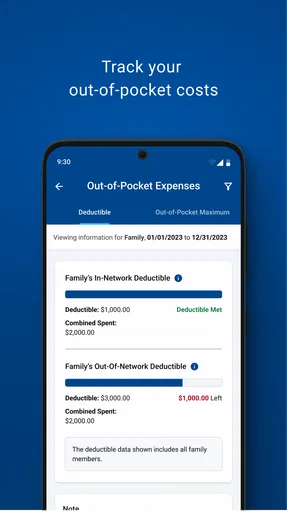
Horizon Blue is designed to give users convenient access to Horizon Blue Cross Blue Shield of New Jersey services from a mobile device. Depending on your plan and eligibility, you may be able to view coverage information, check claims, access digital member identification, search for participating doctors, review costs, and find useful health resources. Available features can vary by membership, location, and app version.
Do I need to be a Horizon Blue member to use the app?
Most of the app’s main functions are intended for Horizon Blue Cross Blue Shield of New Jersey members, so you will generally need valid member credentials to sign in and view personal insurance information. Some public tools or general resources may be available without logging in, but access to claims, benefits, ID cards, and plan details normally requires an eligible account. Your employer or plan type may also affect availability.
Can I use Horizon Blue to show my insurance ID card at a doctor’s office?
Yes, eligible members can typically access a digital version of their Horizon Blue member ID card through the app. This is useful when visiting a doctor, pharmacy, hospital, or other participating provider and you do not have the physical card with you. Before relying on it, make sure the card has loaded correctly and remember that some providers may still request additional identification or insurance details.
Can Horizon Blue help me find doctors, hospitals, or pharmacies in my network?
The app generally includes provider-search tools that can help members locate doctors, hospitals, specialists, pharmacies, and other healthcare facilities connected with their plan. Search results may be filtered by specialty, location, services, or network status. Always confirm the provider’s participation before scheduling care, because networks can change and the final coverage may depend on your specific plan, referral requirements, and the service received.
Is Horizon Blue free to download, and is my personal information secure?
Horizon Blue is generally available to download without an additional app purchase, although normal mobile data charges may apply. Because the app can display sensitive health and insurance information, you should use the official Google Play Store or Apple App Store listing, keep your device updated, and protect access with a strong password or device security feature. Avoid signing in on shared devices and report suspicious account activity promptly.


